


Romantic Stickers WASticker.ly
4.177.00 Reviews
App Specs
- Version
- 53.0
- Updated On
- License
- Free
- Downloads
- 10,000,000+
- Developer
- Future-Apps
- Categories
- Communication
- Platform
- Android
Screenshots
 Analysis by AppCompare
I judge a romantic sticker app less by how many hearts it can show me and more by whether I can find a fitting image quickly, understand how to use it, and send it without disrupting a conversation. Romantic Stickers WASticker.ly is built for that small, specific job: adding affectionate pictures to chats when plain text feels a little flat. It is a communication app from Future-Apps, and its focused theme makes the appeal easy to understand. I see it as a playful add-on for people who already enjoy sending stickers, not as a replacement for messaging or a tool everyone needs.
Finding the right sticker without extra effort
Readability and navigation matter even in a lightweight app. When someone opens a sticker collection, they should be able to scan the choices and pick one without learning a complicated system. The app presents romantic imagery as its main event, so the task is straightforward: browse for a mood, choose a sticker, and use it in a chat. That focus is useful when I want a quick affectionate reply rather than a long search through unrelated images.
A practical tip is to think about the feeling before opening the collection. A playful response, a gentle show of support, and a more openly romantic message do not call for the same image. Deciding on the tone first makes browsing more purposeful and helps avoid sending a sticker that feels too intense for the conversation. I would also keep a small mental shortlist of images that suit everyday situations, so choosing one does not become a routine detour.
Comfort, control, and the pace of use
Stickers are visual, expressive, and easy to understand at a glance, which can be handy when I do not want to compose a full sentence. But the same visual emphasis will not suit everyone. A person who finds busy graphics distracting, has difficulty distinguishing details on a small screen, or prefers text-based communication may get less from a picture-led collection. I would treat the stickers as optional decoration, not as a substitute for clear wording when a message needs to be precise.
There is also a small motor-planning trade-off: every extra step between choosing an image and sending it can interrupt the flow of a chat. If I am replying while walking, carrying something, or trying to keep up with a fast conversation, a short text or an emoji may be the easier choice. I would browse when I have a moment, then use stickers selectively rather than feeling obliged to add one to every exchange. That keeps the app from turning a simple reply into a fiddly task.
Exploring the World of Romantic Stickers
First things first, downloading Romantic Stickers WASticker.ly is a breeze. Just a quick trip to the app store on your Android or iOS device, and you’re ready to spread some love. The installation process is straightforward, and before you know it, you’re in the world of hearts, roses, and all things romantic.
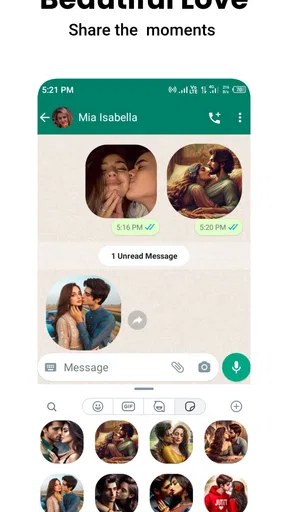
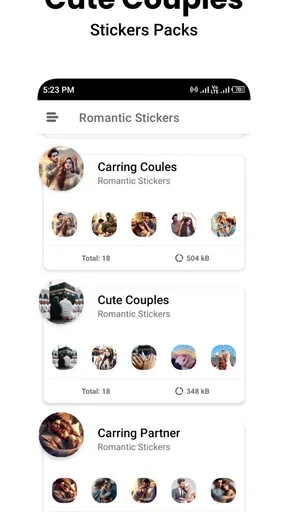
Once you open the app, you’re greeted with an easy-to-navigate interface. The stickers are neatly categorized, making it super simple to find exactly what you’re in the mood for. Whether it’s a cute teddy bear holding a heart or a passionate "I love you," there’s something for everyone. You might end up spending more time than you planned just browsing through the delightful options.
Worth Reading Before You Choose

Flipboard Shows What News Apps Must Do Beyond the Feed

Switching to Android Auto Means Rethinking Your Driving Routine

Google Calendar Makes a Crowded Week Easier to Manage

Ludo King Makes the Most of the Minutes Between Plans

Baby Panda World Brings Quick Play to Modern Phones, but Its Game Library Feels Busy

ESPN’s Live Game View Makes Following Close Games Easier
Customization and Variety
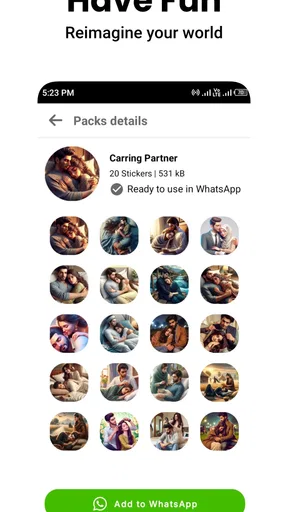
One of the standout features of this app is the sheer variety of stickers available. From animated hearts to cute animal couples, the diversity ensures that you never run out of ways to express your feelings. The developers have done a fantastic job curating a collection that appeals to all tastes. And if you’re a fan of seasonal love, you’ll find stickers that fit perfectly with every holiday or special occasion.
The customization doesn’t stop at variety. The app allows you to save your favorite stickers for quick access, which is a great touch. It feels like the developers understand that sometimes, you just need that perfect sticker on the go. Plus, the frequent updates mean there’s always something new to discover.
Ease of Use
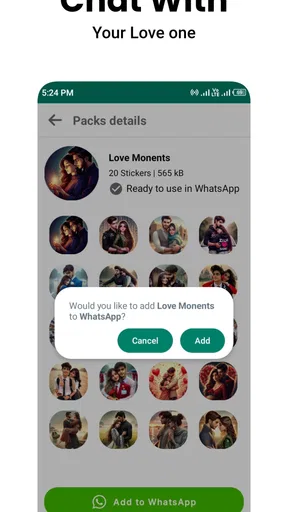
Using the stickers is as simple as pie. Once you’ve installed the app, integrating it with your messaging platform is seamless. Just a few taps, and you’re ready to send your first romantic sticker. It’s compatible with most major messaging apps, which is a huge plus. I found the stickers to be high quality, with vibrant colors and clear images that look fantastic on any device.
Adding stickers to your conversations is intuitive, and you don't have to worry about any complicated steps. This simplicity makes the app accessible to everyone, regardless of how tech-savvy they are.
The Personal Touch
What I love most about Romantic Stickers WASticker.ly is the personal touch it adds to my messages. In a world where digital communication can sometimes feel impersonal, a well-chosen sticker can convey emotions in a way that words might not always capture. It’s like sending a virtual hug or a kiss when you can't be there in person.
Using these stickers has genuinely enriched my conversations. Whether I'm texting a significant other or simply sending a friendly note to a loved one, the stickers bring a smile to their face—and mine. It’s those little moments of joy that make this app truly special.
Everyday uses and sensible alternatives
The best fit is someone who already sends visual messages and wants a dedicated romantic collection close at hand. I can imagine using it during a busy day when my partner sends a quick “thinking of you” message: rather than stop to write a long reply, I pick a warm sticker and add a few words so the meaning stays personal. For an anniversary greeting or a long-distance goodnight, a sticker can make a brief message feel less routine, while a sincere sentence still does the important work.
It can also suit friends and family who use affectionate language casually, but I would pay attention to the relationship and the tone of the chat. A heart or kiss may feel natural to one person and overly intimate to another. When I am unsure, I choose a neutral message or ask how the other person feels about stickers instead of assuming that a romantic image will land well.
Compared with the emoji keyboard built into a phone, a themed sticker collection offers a more deliberate, illustrated expression, but emojis are usually faster for a one-tap reaction. Compared with choosing a picture from a gallery, a sticker app is more convenient for this narrow purpose, though a personal photo or a message written in my own words can feel more individual. If I want broader conversation tools, custom images, or a large range of non-romantic reactions, the sticker options already available in my messaging app may be enough. The advantage here is focus, not a promise to replace those alternatives.
When the setting changes
Situational access affects whether a visual message is a good choice. In a quiet moment at home, I can browse and pick something that fits. In a meeting, class, or shared space, I may want to send a discreet text rather than open a colorful collection and draw attention to my screen. If I am replying in a hurry, I would use a familiar saved option only if it is easy to reach; otherwise, a short written response is more dependable.
There is a useful social distinction, too: a sticker can soften a casual message, but it may not communicate the nuance of an apology, a serious boundary, or an important plan. In those cases I would write the key information plainly and use a sticker only as a small extra, if it feels appropriate. That approach keeps affectionate visuals from obscuring what the other person actually needs to understand.
People often wonder whether a sticker sent from a separate collection can be used in their usual chat app. The experience described here is intended to connect stickers with messaging, and the original review notes compatibility with major messaging apps. Still, I would check that the specific app I use accepts the sticker format before relying on it for a time-sensitive message. Compatibility in general does not guarantee an identical workflow in every messaging service.
What to expect before making it a habit
The app is free, carries an Everyone content rating, and has a 4.0 average from around 23,000 ratings, with more than 10 million installs. It was released on May 7, 2023, and its current version is 50.0, with Android 8.0 as the minimum operating-system requirement. Those details give a useful sense of its reach and basic availability, but they do not tell me whether every sticker will match my taste or whether the app will suit my particular way of communicating. I would try it for the collection itself, rather than treating popularity as proof that it is right for everyone.
Because the theme is specifically romantic, its usefulness depends on how often that tone fits my real conversations. Someone who mostly chats in work groups, prefers understated text, or wants stickers for many different moods may find a broad sticker keyboard more practical. A person who enjoys sending affectionate images but dislikes browsing can also find the collection less convenient if the available choices do not quickly match the moment. In that case, a saved favorite or a simple emoji may be a better everyday option.
One small workflow tip is to pair a sticker with a short, clear line when context matters: the image adds warmth, while the words explain what I mean. I would also avoid sending several decorative images in a row unless I know the other person enjoys that style. This keeps the visual gesture from crowding out the conversation and makes a well-chosen sticker feel intentional rather than automatic.
Final Thoughts
All in all, Romantic Stickers WASticker.ly is a delightful addition to anyone's app collection. It's fun, it's easy to use, and it brings an extra layer of emotion to your messages. If you're looking to add a bit of charm and romance to your digital conversations, I’d say this app is definitely worth a download.
So, what are you waiting for? Head over to your app store, download the app, and start spreading some love one sticker at a time. Your chats will never be the same!
An inclusive choice, with limits
For me, the inclusive value is its low-pressure, visual way of showing affection: I can send a small gesture without expecting everyone to express themselves through long messages. That does not make it universally accessible. People who rely on text, use assistive settings, or avoid decorative images may prefer their messaging app’s standard reactions or a plain sentence. I would not choose a sticker as the only way to communicate something essential.
The app is at its best when I want a quick, warm accent and the other person welcomes that style. It is less suitable when clarity, privacy in a public setting, or a highly personal message matters more than decoration. If that balance matches the way you chat, this focused collection is worth trying; if not, your regular emoji keyboard or direct words may be the more comfortable choice.
Pros
- Vast collection of romantic stickers.
- Easy to add to WhatsApp.
- Regular updates with new content.
- High-quality
- vibrant graphics.
- User-friendly interface.
Cons
- Limited to WhatsApp only.
- No customization options.
- Ads can be intrusive.
- Requires internet for updates.
- No animated stickers.
FAQs for Romantic Stickers WASticker.ly
What is Romantic Stickers WASticker.ly, and how does it work?
Romantic Stickers WASticker.ly is an app designed for WhatsApp users who want to express their feelings through romantic stickers. It provides a vast collection of romantic-themed stickers that can be easily integrated into your WhatsApp conversations. Simply download the app, select your favorite stickers, and add them to your WhatsApp sticker collection to start using them in chats.
Is Romantic Stickers WASticker.ly free to use?
Yes, the basic version of Romantic Stickers WASticker.ly is free to download and use. However, it may offer in-app purchases or ads to access premium sticker packs or remove advertisements. This model allows users to enjoy a wide range of stickers without any initial cost while providing options for additional features.
How often are new stickers added to Romantic Stickers WASticker.ly?
The app regularly updates its sticker library to keep the content fresh and engaging. Users can expect new sticker packs to be added periodically, often aligned with special occasions or trending themes. To ensure you have access to the latest stickers, keep the app updated and check for new releases in the app store.
Can I customize or create my own stickers in Romantic Stickers WASticker.ly?
Currently, Romantic Stickers WASticker.ly focuses on providing curated romantic sticker packs rather than offering customization or sticker creation tools. Users can browse through a wide selection of pre-made stickers, but creating custom stickers is not a feature at this time. This might change with future updates, so stay tuned for new features.
Does Romantic Stickers WASticker.ly have any special requirements for installation?
To install Romantic Stickers WASticker.ly, your device must run on Android 4.0.3 or above, or iOS 10.0 or later. Ensure your device meets these requirements for optimal performance. Additionally, as with most apps, a stable internet connection is recommended for downloading sticker packs and receiving updates.


